woensdag, april 29, 2009

jQuery opensource tool: Glimmer
It's been a very long time (al most a year!) since a blogged the last time...
Just noticed a tweet:
We are excited to announce Glimmer:
a jQuery Interactive Design Tool. => get it @ http://visitmix.com/lab/glimmer
Just noticed a tweet:
We are excited to announce Glimmer:
a jQuery Interactive Design Tool. => get it @ http://visitmix.com/lab/glimmer
donderdag, juni 19, 2008
woensdag, mei 21, 2008
Sharepoint 2007 limits overview
When setting up Sharepoint 2007 or creating custom stuff for Sharepoint, please take a look at this:
- Detailed Sharepoint limits overview
- Plan for software boundaries (detail overview of limitations, performance tips, ....)
Also notice that there are also limitations for security principles:
"Security principal: max 2,000 per Web site. The size of the access control list is limited to a few thousand security principals (users and groups in the Web site)."
zaterdag, maart 15, 2008
Seen on TechDays2008
Last week I went to TechDays 2008 at the ICC in Ghent. You can find an overview of the program/presentations over here .
I will give a quick overview of the most intresting topics. I will try to add some more info when there are new video's/presentations available.
LINQ
- Building your own LINQ-TO Provider (level 350) by Bart De Smet
- LINQ to Active Directory (formerly known as LINQ to LDAP)
WCF/WF
- Integrating WCF + WF : by Ingo Rammer
- The ABC of building services with WCF by Peter Himschoot
=> download presentations here - Intro blogspost about ABC of WCF by Dennis van der Stelt
WPF
- Great WPF application, Zurich Airport Overview Map
=> blog post
=> View Live demo
ASP.NET/WSS/MOSS
- Building Ria's for WSS 3.0 / MOSS 2007 by Patrick Tisseghem
=> How to configure your SharePoint extended IIS Web App for working with Silverlight 2 application
=> Silverlight BluePrint for SharePoint back alive! - MVC ASP.NET by Matt Gibbs
=> View Video
=> ASP.NET MVC Framework (Part 1) by ScottGu - Building internet web sites using MOSS 2007 by Joris Poelmans
Other
- Advanced Debugging with Visual Studio by Ingo Rammer
=> Download presentation and code here - Dude were's my business logic by Chad Hower
=> View video presentation here - Fun in .NET by Chad Hower
=> Rocket launcher controlled by .NET
=> Control Xbox with WiiMote - Unit Testing & Deep Reflection by Roy Osherove (man with guitar)
=> The evolution of Unit Testing Syntax and Semantics - Power of data mining by rafal lukawiecki
* Tools
- ZOOMIT: nice tool for zooming during presentations: download here
woensdag, december 12, 2007
Release of WSS 3.0 SP1 and Office SharePoint Server 2007 SP1
All the needed info can be found here: TECHNET
- Service pack fixes of Windows SharePoint Services 3.0 Service Pack 1
http://support.microsoft.com/kb/936988 - Service pack fixes of 2007 Microsoft Office servers Service Pack 1
http://support.microsoft.com/kb/936984
Great blogpost: http://blogs.msdn.com/sharepoint/archive/2007/12/11/announcing-the-release-of-wss-3-0-sp1-and-office-sharepoint-server-2007-sp1.aspx
dinsdag, oktober 02, 2007
Redirecting after using InfoPath Form (web-enabled) in Sharepoint 2007
- Use the Source query string: so the page will know where to navigate to after the form is closed or submitted (Watch Out: The URL must be in the same site collection or an error will be returned.)
- Add the OnClose event to the XmlFormView, add code to redirect after closing:
Response.Redirect(http://www.dolmen.be);
In the Infopath Form, you must add the Action: "Close this form: No Prompt" in the rules of the InfoPath Button, otherwise the OnClose event won't fire.
Source blogposts:
maandag, augustus 27, 2007
MCTS for .NET 2.0 Web applications (Exam 070-528)

Just like my colleague MaBal did, I passed the Microsoft.NET Framework 2.0 - Web-based Client Development (Exam 070-528) exam!
Now I can call myself: Microsoft Certified Technology Specialist for .NET framework 2.0 Web applications.
zondag, augustus 19, 2007
Query DataConnection in Infopath Web-enabled Form when selecting value of dropdownlost (with Managed Code)
You don't always need to load your dataconnection before the form is loaded (performance reasons), sometimes you want to load a different dataconnection when a certain value is selected. I use the example of a dropdownlist, and every value of the dropdownlist will load an other dataconnection into another dropdownlist.
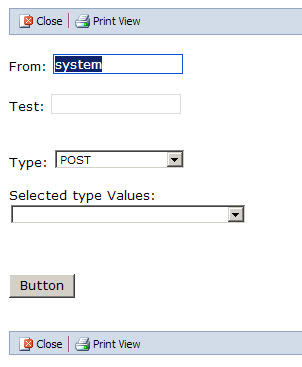
Add the 2 dropdownlists, the second dropdownlist must have a connection with a datasource (I use an embedded Xml file dc.xml). When creating this dataconnection, please deselect the setting "Automatically retrieve dat when form is opened".
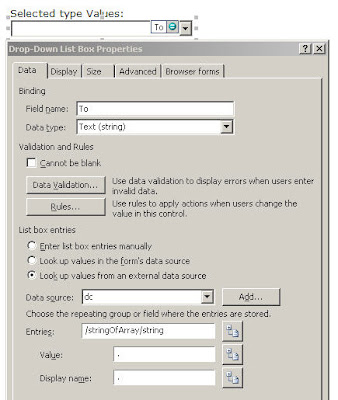
What you will need after you created the controls in infopath, open VSTA (alt+shift+F12). Add following code fragment into the InternalStartup method:
You also need to add the TypeChanged methods:
When you use the Execute method of a dataconnection, you must change following setting (it is like the ASP.NET AutoPostBack setting), otherwise your dataconnection will not be loaded!! (when you just changed a value of another field, you don't need to change this setting).
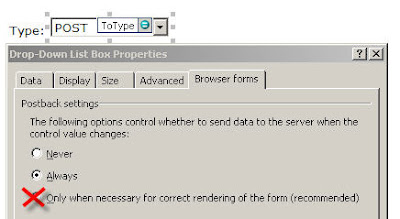
Change the standard option (postback settings): "Only when necessary for correct rendering of the form (recommended)" to "Always"
Remarks:
When you use Mananged Code in web-enabled form, uou must publish it as an administrator approved template (check out blogpost http://spsfactory.blogspot.com/2007/01/walkthrough-publishing-administrator.html )

Add the 2 dropdownlists, the second dropdownlist must have a connection with a datasource (I use an embedded Xml file dc.xml). When creating this dataconnection, please deselect the setting "Automatically retrieve dat when form is opened".

What you will need after you created the controls in infopath, open VSTA (alt+shift+F12). Add following code fragment into the InternalStartup method:
this.EventManager.XmlEvents["/my:myFields/my:Type"].Changed += new XmlChangedEventHandler(TypeChanged);
You also need to add the TypeChanged methods:
void TypeChanged(object sender,XmlEventArgs e)
{
  string type = e.NewValue; //the selected value of the type dropdownlist

  //I just added one dataconnection called dc (value when you select POST)
  //You need to put here code (switch) for all the values in the type ddl
  DataSource ds = this.DataSources[type];
  DataConnection dc = ds.QueryConnection;

  dc.Execute();
}
When you use the Execute method of a dataconnection, you must change following setting (it is like the ASP.NET AutoPostBack setting), otherwise your dataconnection will not be loaded!! (when you just changed a value of another field, you don't need to change this setting).

Change the standard option (postback settings): "Only when necessary for correct rendering of the form (recommended)" to "Always"
Remarks:
When you use Mananged Code in web-enabled form, uou must publish it as an administrator approved template (check out blogpost http://spsfactory.blogspot.com/2007/01/walkthrough-publishing-administrator.html )
maandag, augustus 13, 2007
Adding AppSettings to a Sharepoint Web Application Web.Config
I use this code to add key/values to the web.config during installation of features
Sources:
(using Microsoft.SharePoint.Administration;)
string siteName = "http://moss";
SPSite site = .....;
SPWebApplication webApp = site.WebApplication;
System.Collections.ObjectModel.CollectionallModifications= webApp.WebConfigModifications;
AddNewAppSetting(allModifications,"testkey1","testvalue1");
AddNewAppSetting(allModifications,"testkey2","testvalue2");
SPFarm.Local.Services.GetValue().ApplyWebConfigModifications();
------
private void AddNewAppSetting(System.Collections.ObjectModel.CollectionallModifications,string name, string value)
{
SPWebConfigModification modification = new SPWebConfigModification(string.Format
("add[@key='{0}']", name), "/configuration/appSettings");
modification.Type =
SPWebConfigModification.SPWebConfigModificationType.EnsureChildNode;
modification.Value = string.Format(CultureInfo.InvariantCulture,string.Format
("",name,value) );
if (allModifications.Contains(modification))
{
allModifications.Remove(modification);
}
allModifications.Add(modification);
}
Sources:
donderdag, juli 05, 2007
CAML and strange characters like '&'
Some day, my Caml Query failed with this exception:
"The property Query contains an invalid value."
The CAML XML:
I noticed the & and found out that the & character was the problem. Changing it into the encoded & gave the same problem... Thx to JOPX's connections in the Sharepoint world (of art;-) ) someone gave me a tip: try it with CDATA.....
So I check that out........ and it worked!!
So you need to put a CDATA tag around the text that can contain strange characters:
My new correct working CAML XML look like this:
Some more info about CDATA:
Source: http://www.w3schools.com/
A CDATA section starts with "<![CDATA[" and ends with
"]]>":
In the example above, everything inside the CDATA section is ignored by
the parser.
Notes on CDATA sections:
A CDATA section cannot contain the string "]]>", therefore, nested CDATA sections are not allowed. Also make sure there are no spaces or line breaks inside the "]]>" string.
"The property Query contains an invalid value."
The CAML XML:
<pre>
<Where>
  <Eq>
    <FieldRef Name='Summary'/><Value Type='Text'>jeroen & doreen></Value>
  </Eq>
</Where>
I noticed the & and found out that the & character was the problem. Changing it into the encoded & gave the same problem... Thx to JOPX's connections in the Sharepoint world (of art;-) ) someone gave me a tip: try it with CDATA.....
So I check that out........ and it worked!!
So you need to put a CDATA tag around the text that can contain strange characters:
My new correct working CAML XML look like this:
<Where>
  <Eq>
    <FieldRef Name='Summary'/>
      <Value Type='Text'>  <![CDATA[jeroen & doreen]]> </Value>
  </Eq>
</Where>
Some more info about CDATA:
Source: http://www.w3schools.com/
A CDATA section starts with "<![CDATA[" and ends with
"]]>":
<script> |
In the example above, everything inside the CDATA section is ignored by
the parser.
Notes on CDATA sections:
A CDATA section cannot contain the string "]]>", therefore, nested CDATA sections are not allowed. Also make sure there are no spaces or line breaks inside the "]]>" string.
maandag, juni 25, 2007
Microsoft .NET Magazine #17: Legends never die on the front ?!
Today I spotted myself on the cover of the new Microsoft .NET Magazine....

I will post some more info when I have got the time for it....
Notice that JOPX has a nice cool earring.... ;)
Microsoft .NET Magazine:
http://www.microsoft.com/netherlands/msdn/netmagazine/default.aspx

I will post some more info when I have got the time for it....
Notice that JOPX has a nice cool earring.... ;)
Microsoft .NET Magazine:
http://www.microsoft.com/netherlands/msdn/netmagazine/default.aspx
woensdag, juni 06, 2007
Creating Managed Properties for use in SharePoint Server Enterprise Custom Search through Code
Use the following Code to add Managed Properties in Code, the Managed Properties are created from crawled properties (like an infopath published form)
SOURCES:
//Get search Schema
ServerContext serverContext = ServerContext.GetContext("SharedServices1");
SearchContext searchContext = SearchContext.GetContext(serverContext);
Schema schema = new Schema(searchContext);

//Get the list of properties (here from a published infoPath Form), you want to use in search
StringCollection infoPathFormProperties = GetData.GetAllInfoPathPublishedFields();
// Create new ManagedProperties
foreach (string infoPathFormProperty in infoPathFormProperties)
{
        string managedPropertyName = infoPathFormProperty;
        string infoPathFormPropertyPublished = string.Format("ows_{0}", infoPathFormProperty); //infopath published fields will be added as ows_[NAME]

        // If you create a prop that already exists, you will get an SqlException (duplicate key),so you need this check
        if (!schema.AllManagedProperties.Contains(managedPropertyName))
        {
             ManagedProperty newManagedProperty = schema.AllManagedProperties.Create(managedPropertyName, ManagedDataType.Text);

             // Get the (crawled) property you want to map in the ManagedProperty
             CrawledProperty cprop = null;
             foreach (CrawledProperty prop in schema.QueryCrawledProperties(infoPathFormPropertyPublished, 1000, Guid.NewGuid(), string.Empty, true))
             {
                  //schema.GetCrawledProperty(Guid.NewGuid(), infoPathFormPropertyPublished, 0); //can't use this, you need also need the Guid and variantType, and you only know the name
                  //QueryCrawledProperties will be filtered on CONTAINING infoPathFormPropertyPublished value, so extra check if the Name is equal!
                  if (prop.Name == infoPathFormPropertyPublished)
                  {
                       cprop = prop;
                       break;
                  }
              }

              if (cprop != null)
              {
                   // Map the crawled prop to the Managed Prop
                   MappingCollection mappings = new MappingCollection();
                   mappings.Add(new Mapping(cprop.Propset, cprop.Name, cprop.VariantType, newManagedProperty.PID));

                   newManagedProperty.SetMappings(mappings);

                   // Set Some other properties
                   newManagedProperty.FullTextQueriable = true;
                   newManagedProperty.EnabledForScoping = true;
                   newManagedProperty.Update();
               }
               else
               {
                   MessageBox.Show(string.Format("Published Infopath field {0} not found",infoPathFormPropertyPublished));
               }

               }
        else
        {
             MessageBox.Show(infoPathFormProperty  +" already exists");
        }
}
SOURCES:
- Blogpost from Patrick Tisseghem on MSDN:
Creating and Exposing Managed Properties in the Advanced Search Page of SharePoint Server Enterprise Search (technical details) - Managing Metadata : explaining the functional details
maandag, mei 21, 2007
Some late Christmas gifts for Sharepoint Developers!
Thx to JOPX he made a post with some very usefull links for Sharepoint Developers, check out his blog for more tips, tricks, tools and fools ;-)
DEBUGGING TIPS:
DEBUGGING TIPS:
- Script to recycle specific Application pool (instead of slow iisreset):
App Pool Recycler for SharePoint devs - Debugger "Feature" for SharePoint
CAML QUERY
- SPCamlViewer Tool by Renaud Comte (very good tool to test caml)
- CAML Query Builder (creating dynamic, reusable CAML query components)
check out some examples here
QUERY SHAREPOINT
dinsdag, mei 15, 2007
SPSecurity.RunWithElevatedPrivileges to update SPRoleAssignment of an SPListItem
When you write custom code in Sharepoint webparts, your code will run with your credentials.
Not everybody has Full Control, so when a user has only read rights, the code will throw an access denied error when the code needs access to objects that are not in the scope of the user credentials.... (example: add the username in the ReadBy properties of an item).
What you need is impersonation, run your code with the help of a user who has just enough rights to run it. Sharepoint has a built-in function to accomplish this: SPSecurity.RunWithElevatedPrivileges, it runs with the System Account User.
Some things you should know when using SPSecurity.RunWithElevatedPrivileges:
- in the delegate function, you must build a new SPSite/SPWeb object (like SPSite siteColl = new SPSite(App.SITE_COLLECTION_URL)) and you can't use the SPContext.Current.Web, because the SPContext runs with the current context (with current user).
- Also set the AllowUnsafeUpdates property of the site/web where you will be updating/accessing stuff to true, to be sure you don't get an error like "The security validation for this page is invalid" (see more below). If you don't do it, you code will work, but when returning from the delegate function, the error will arise..
Code sample:
I run the "Elevated code" when the button btn is clicked in a webpart:
void btn_Click(object sender, EventArgs e)
{
{
SPSecurity.RunWithElevatedPrivileges(TestSec);
}
catch (Exception ex)
{
throw ex;
}
}
public void TestSec()
{
SPSite siteColl = new SPSite(App.SITE_COLLECTION_URL);
SPWeb site = siteColl.AllWebs[App.WEB_NAME];
SPList list = site.Lists["Test"];
SPListItem testItem = list.GetItemById(1);
site.AllowUnsafeUpdates = true;
SPRoleDefinition roleDefinitionContributor = site.RoleDefinitions.GetByType(SPRoleType.Contributor);
SPRoleAssignment roleAssignment = new SPRoleAssignment("DOMAIN\\USERNAME", "", "", "");
roleAssignment.RoleDefinitionBindings.Add(roleDefinitionContributor);
////Check for permission inheritance, and break if necessary
if (!testItem.HasUniqueRoleAssignments)
{
testItem.BreakRoleInheritance(false); //pass true to copy role assignments from parent, false to start from scratch
}
testItem.RoleAssignments.Add(roleAssignment);
testItem.Update();
site.AllowUnsafeUpdates = false;
siteColl.Close();
site.Close();
}
Error when not setting AllowUnsafeUpdates = true:
Server Error in '/' Application.
--------------------------------------------------------------------------------
The security validation for this page is invalid. Click Back in your Web browser, refresh the page, and try your operation again.
Description: An unhandled exception occurred during the execution of the current web request. Please review the stack trace for more information about the error and where it originated in the code.
Exception Details: System.Runtime.InteropServices.COMException: The security validation for this page is invalid. Click Back in your Web browser, refresh the page, and try your operation again.
Source Error:
An unhandled exception was generated during the execution of the current web request. Information regarding the origin and location of the exception can be identified using the exception stack trace below.
Stack Trace:
[COMException (0x8102006d): The security validation for this page is invalid. Click Back in your Web browser, refresh the page, and try your operation again.]
Microsoft.SharePoint.Library.SPRequestInternalClass.UpdateRoleAssignment(String bstrUrl, Guid& pguidScopeId, Int32 lPrincipalID, Object& pvarArrIdRolesToAdd, Object& pvarArrIdRolesToRemove) +0
Microsoft.SharePoint.Library.SPRequest.UpdateRoleAssignment(String bstrUrl, Guid& pguidScopeId, Int32 lPrincipalID, Object& pvarArrIdRolesToAdd, Object& pvarArrIdRolesToRemove) +119
[SPException: The security validation for this page is invalid. Click Back in your Web browser, refresh the page, and try your operation again.]
OfficialMail.WebParts.TestWebPart.btn_Click(Object sender, EventArgs e) +94
System.Web.UI.WebControls.Button.OnClick(EventArgs e) +105
System.Web.UI.WebControls.Button.RaisePostBackEvent(String eventArgument) +107
System.Web.UI.WebControls.Button.System.Web.UI.IPostBackEventHandler.RaisePostBackEvent(String eventArgument) +7
System.Web.UI.Page.RaisePostBackEvent(IPostBackEventHandler sourceControl, String eventArgument) +11
System.Web.UI.Page.RaisePostBackEvent(NameValueCollection postData) +33
System.Web.UI.Page.ProcessRequestMain(Boolean includeStagesBeforeAsyncPoint, Boolean includeStagesAfterAsyncPoint) +5102
Sources:
maandag, mei 14, 2007
Invalid characters and URLs in SharePoint 2007 (2003)
Nice to know when developping Sharepoint stuff:
Invalid characters and URLs in SharePoint (Eric Legault My Eggo blog)
Thx to Jopx for the link
Invalid characters and URLs in SharePoint (Eric Legault My Eggo blog)
Thx to Jopx for the link
maandag, maart 26, 2007
Reflector 5
Handy tool:
Download it here:
Download it here:
- Reflector 5.0
- Reflector 5.0 Add-Ins @ CodePlex
- Reflector 5.0 New Features (PPT)
More info @ http://www.hanselman.com/blog/Reflector5ReleasedWorldDominationAssured.aspx
vrijdag, maart 02, 2007
Working with the Replicator in Sharepoint Workflows, some serialize issues & tricks
Before reading this post:
- Read about workflows and its replicator activity.
- ECM Starter Kit and Workflow Development Starter Kit for WSS 3.0 RTM: many examples
 When initializing a replicator you need to pass initiation data (like the foreach collection data). So if you want to pass a Contact for each replicated activity, you will set the initiationChildData (must implement IList) with Contact objects:
adding contacts like this: replicatorInitialChildData.Add(contact);
Sometimes you want the add your own classes to the List. You would except that this wouldn't be difficult, in fact it isn't:
Create the initiation data list with objects of your custom class:
IList replicatorInitialChildData = new List
/ fill the list with the ApproverFlow objects
replicatorInitialChildData.Add(appFlowObj1);
replicatorInitialChildData.Add(appFlowObj2);
The code will compile, the workflow will succeed sometimes (when the replicator is used in Parallel execution), sometimes not (when the replicator is used in Sequence execution), after a while you will notice this kind of errors:
(in the log folder in C:\Program Files\Common Files\Microsoft Shared\web server extensions\12\LOGS)
Workflow Infrastructure 72eo Unexpected DehydrateInstance: System.Runtime.Serialization.SerializationException: End of
Stream encountered before parsing was completed. at System.Runtime.Serialization.Formatters.Binary.__BinaryParser.Run() at
System.Runtime.Serialization.Formatters.Binary.ObjectReader.Deserialize(HeaderHandler handler, __BinaryParser serParser, Boolean fCheck,
Boolean isCrossAppDomain, IMethodCallMessage methodCallMessage) at
System.Runtime.Serialization.Formatters.Binary.BinaryFormatter.Deserialize(Stream serializationStream, HeaderHandler handler, Boolean
fCheck, Boolean isCrossAppDomain, IMethodCallMessage methodCallMessage) at
System.Runtime.Serialization.Formatters.Binary.BinaryFormatter.Deserialize(Stream serializationStream) at
System.Workflow.ComponentModel.Activity.Load(Stream stream,...
02/27/2007 14:50:31.00* w3wp.exe (0x0A98) 0x1700 Windows SharePoint Services Workflow Infrastructure
72eo Unexpected ... Activity outerActivity, IFormatter formatter) at
System.Workflow.ComponentModel.Activity.Load(Stream stream, Activity outerActivity) at
System.Workflow.Runtime.Hosting.WorkflowPersistenceService.RestoreFromDefaultSerializedForm(Byte[] activityBytes, Activity outerActivity)
at Microsoft.SharePoint.Workflow.SPWinOePersistenceService.LoadWorkflowInstanceState(Guid instanceId) at
System.Workflow.Runtime.WorkflowRuntime.InitializeExecutor(Guid instanceId, CreationContext context, WorkflowExecutor executor,
WorkflowInstance workflowInstance) at System.Workflow.Runtime.WorkflowRuntime.Load(Guid key, CreationContext context,
WorkflowInstance workflowInstance) at System.Workflow.Runtime.WorkflowRuntime.GetWorkflow(Guid instanceId) at
Microsoft.SharePoint.Workflow.SPWinO...
System.Reflection.TargetInvocationException: Exception has been thrown by the target of an invocation. --->
System.InvalidOperationException: The platform does not know how to deserialize an object of type OfficialMail.Common.ApproverFlow+Approver. The platform can deserialize primitive types such as strings, integers, and GUIDs; other
SPPersistedObjects or SPAutoserializingObjects; or collections of any of the above. Consider redesigning your objects to store values in
one of these supported formats, or contact your software vendor for support.
You will notice the deserialize stuff.... If you think further, ..... whole the workflow idea is that every instance can be serialized or deserialized, because a workflow can wait for some other stuff, so objects will be saved somewhere (not in memory) when workflow is waiting.
When the replicator starts in parallel execution, no (de)serialize will occur because the workflow doens't need to serialize the objects, the replicator executes everything at once.
But when the replicator executes in sequence, it does need (de)serializing because the workflow will pause before executing the next step (so state is saved:(de)serializing occurs).
So when you want to add your own classes, keep in mind that your own class must be serializable.
Which types are serializable?
The platform can deserialize primitive types such as strings, integers, and GUIDs; other SPPersistedObjects or SPAutoserializingObjects; or collections of any of the above.
In one of the next blog posts, I will explain how to add/change data when the replicator is already running ...
dinsdag, februari 20, 2007
Team System : Team Explorer free download!
A reminder for myself ;-)
An essential client-side piece of Team System that installs as a Visual Studio 2005 add-in:
http://blogs.vertigosoftware.com/teamsystem/archive/2006/05/22/2778.aspx
An essential client-side piece of Team System that installs as a Visual Studio 2005 add-in:
http://blogs.vertigosoftware.com/teamsystem/archive/2006/05/22/2778.aspx
woensdag, februari 14, 2007

.JPG)
Abonneren op:
Posts (Atom)
