Nice to know when developping Sharepoint stuff:
Invalid characters and URLs in SharePoint (Eric Legault My Eggo blog)
Thx to Jopx for the link
Posts tonen met het label Web Part. Alle posts tonen
Posts tonen met het label Web Part. Alle posts tonen
maandag, mei 14, 2007

maandag, januari 15, 2007
Handle the InfoPath Forms Services by yourself (in a Custom WebPart to view a web-enabled Infopath 2007 Form)
To understand this post well, please go through this post first:
- Hosting the InfoPath 2007 Form Editing Environment in a Custom Web Form
Sometimes you don't want to popup an error by InfoPath Forms Services (it will log this also in the EventLog), see image below. You want to catch the error in code and do some custom logging (or other stuff)
- Hosting the InfoPath 2007 Form Editing Environment in a Custom Web Form
Sometimes you don't want to popup an error by InfoPath Forms Services (it will log this also in the EventLog), see image below. You want to catch the error in code and do some custom logging (or other stuff)

I will use the example when a dataconnection (webservices) in the form gives a time-out.
Preceding:
First keep in mind that we will bind the dataconnection-webservice to its control in code, so you have to deselect - Automatically retrieve data when form is opened (when adding a data-connection in InfoPath). Also don't forget to link the control with the dataconnection in infopath designer
What we gonna do in code:
- Add a handler that will get you into the Initialize methods of the XmlFormView
- Get the right dataconnection, execute it (so it will get the data and bind to the control)
- Add a "try/catch" block around this code
The code:
void viewform_Initialize(object sender, InitializeEventArgs e)
{
   try
   {
      DataConnection dc = _viewform.XmlForm.DataSources["GetGAL"].QueryConnection;
      dc.Execute();
   }
   catch (System.Net.WebException webEx)
   {
      WarmUpWebService();
      ReloadWebPart();
      //Log, ...
   }
   catch (Exception ex)
   {
      Logger.Log(ex, ...);
   }
}

Some other InfoPath blogs:
zaterdag, november 25, 2006
SPListItem looses Property data type when publishing Infopath form to a sharepoint list (MOSS 2007 beta2TR)
When you publish a Infopath Form to a sharepoint list, the Infopath form contains some fields (text and date(time) data types). These fields are copied to a sharepoint list when you publish the form to it.

You should think sharepoint keeps the data types like in the infopath form, but this isn't, I noticed that the date(time) data type is just a string/text field in the sharepoint list!
The strange thing is that when you add a column in the published list manualy (for example a datetime field), it will keep the data type and not change it to a string.
I noticed it when a wanted to perform an update an a field called ApprovalDate (Date Datatype) in a Web Part:
SPSite site = new SPSite("http://......");
SPListItemCollection results = site.Lists["InfopathPublishedList"].Items;
foreach (SPListItem item in results)
{
     item.Properties["ApprovalDate"] = DateTime.Today;//DateTime.Today.ToString();
 item.Update();
}
This code failed when I did this on the datetime field published by infopath:
Error:Specified data type does not match the current data type of the property. at Microsoft.SharePoint.Utilities.SPUtility.UpdateArrayFromHashtable(Object& o, Hashtable ht) at Microsoft.SharePoint.SPListItem.PrepareItemForUpdate(Guid newGuidOnAdd, Boolean bMigration, Boolean& bAdd, Boolean& bPublish, Object&
objAttachmentNames, Object& objAttachmentContents, Int32& parentFolderId) at Microsoft.SharePoint.SPListItem.UpdateInternal(Boolean bSystem, Boolean bPreserveItemVersion, Guid newGuidOnAdd, Boolean bMigration,
Boolean bPublish, Boolean bNoVersion, Boolean bCheckOut, Boolean bCheckin, Boolean suppressAfterEvents) at Microsoft.SharePoint.SPListItem.Update()
This doesn't happen if the ApprovalDate is added by create column in the list.
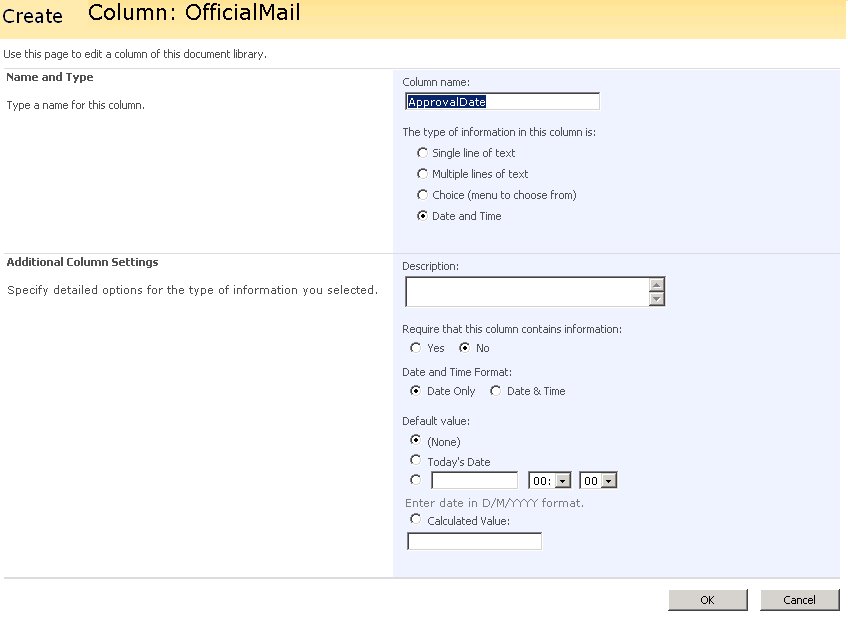
So watch out, and as you notice in the picture below: It ain't what it look like........

Abonneren op:
Posts (Atom)

