
I will post some more info when I have got the time for it....
Notice that JOPX has a nice cool earring.... ;)
Microsoft .NET Magazine:
http://www.microsoft.com/netherlands/msdn/netmagazine/default.aspx
//Get search Schema
ServerContext serverContext = ServerContext.GetContext("SharedServices1");
SearchContext searchContext = SearchContext.GetContext(serverContext);
Schema schema = new Schema(searchContext);

//Get the list of properties (here from a published infoPath Form), you want to use in search
StringCollection infoPathFormProperties = GetData.GetAllInfoPathPublishedFields();
// Create new ManagedProperties
foreach (string infoPathFormProperty in infoPathFormProperties)
{
        string managedPropertyName = infoPathFormProperty;
        string infoPathFormPropertyPublished = string.Format("ows_{0}", infoPathFormProperty); //infopath published fields will be added as ows_[NAME]

        // If you create a prop that already exists, you will get an SqlException (duplicate key),so you need this check
        if (!schema.AllManagedProperties.Contains(managedPropertyName))
        {
             ManagedProperty newManagedProperty = schema.AllManagedProperties.Create(managedPropertyName, ManagedDataType.Text);

             // Get the (crawled) property you want to map in the ManagedProperty
             CrawledProperty cprop = null;
             foreach (CrawledProperty prop in schema.QueryCrawledProperties(infoPathFormPropertyPublished, 1000, Guid.NewGuid(), string.Empty, true))
             {
                  //schema.GetCrawledProperty(Guid.NewGuid(), infoPathFormPropertyPublished, 0); //can't use this, you need also need the Guid and variantType, and you only know the name
                  //QueryCrawledProperties will be filtered on CONTAINING infoPathFormPropertyPublished value, so extra check if the Name is equal!
                  if (prop.Name == infoPathFormPropertyPublished)
                  {
                       cprop = prop;
                       break;
                  }
              }

              if (cprop != null)
              {
                   // Map the crawled prop to the Managed Prop
                   MappingCollection mappings = new MappingCollection();
                   mappings.Add(new Mapping(cprop.Propset, cprop.Name, cprop.VariantType, newManagedProperty.PID));

                   newManagedProperty.SetMappings(mappings);

                   // Set Some other properties
                   newManagedProperty.FullTextQueriable = true;
                   newManagedProperty.EnabledForScoping = true;
                   newManagedProperty.Update();
               }
               else
               {
                   MessageBox.Show(string.Format("Published Infopath field {0} not found",infoPathFormPropertyPublished));
               }

               }
        else
        {
             MessageBox.Show(infoPathFormProperty  +" already exists");
        }
}
CAML QUERY
QUERY SHAREPOINT
When you write custom code in Sharepoint webparts, your code will run with your credentials.
Not everybody has Full Control, so when a user has only read rights, the code will throw an access denied error when the code needs access to objects that are not in the scope of the user credentials.... (example: add the username in the ReadBy properties of an item).
What you need is impersonation, run your code with the help of a user who has just enough rights to run it. Sharepoint has a built-in function to accomplish this: SPSecurity.RunWithElevatedPrivileges, it runs with the System Account User.
Some things you should know when using SPSecurity.RunWithElevatedPrivileges:
Code sample:
I run the "Elevated code" when the button btn is clicked in a webpart:
void btn_Click(object sender, EventArgs e)
{
{
SPSecurity.RunWithElevatedPrivileges(TestSec);
}
catch (Exception ex)
{
throw ex;
}
}
public void TestSec()
{
SPSite siteColl = new SPSite(App.SITE_COLLECTION_URL);
SPWeb site = siteColl.AllWebs[App.WEB_NAME];
SPList list = site.Lists["Test"];
SPListItem testItem = list.GetItemById(1);
site.AllowUnsafeUpdates = true;
SPRoleDefinition roleDefinitionContributor = site.RoleDefinitions.GetByType(SPRoleType.Contributor);
SPRoleAssignment roleAssignment = new SPRoleAssignment("DOMAIN\\USERNAME", "", "", "");
roleAssignment.RoleDefinitionBindings.Add(roleDefinitionContributor);
////Check for permission inheritance, and break if necessary
if (!testItem.HasUniqueRoleAssignments)
{
testItem.BreakRoleInheritance(false); //pass true to copy role assignments from parent, false to start from scratch
}
testItem.RoleAssignments.Add(roleAssignment);
testItem.Update();
site.AllowUnsafeUpdates = false;
siteColl.Close();
site.Close();
}
Sources:
More info @ http://www.hanselman.com/blog/Reflector5ReleasedWorldDominationAssured.aspx
Before reading this post:
 When initializing a replicator you need to pass initiation data (like the foreach collection data). So if you want to pass a Contact for each replicated activity, you will set the initiationChildData (must implement IList) with Contact objects:
I will use the example when a dataconnection (webservices) in the form gives a time-out.
Preceding:
First keep in mind that we will bind the dataconnection-webservice to its control in code, so you have to deselect - Automatically retrieve data when form is opened (when adding a data-connection in InfoPath). Also don't forget to link the control with the dataconnection in infopath designer
What we gonna do in code:
- Add a handler that will get you into the Initialize methods of the XmlFormView
- Get the right dataconnection, execute it (so it will get the data and bind to the control)
- Add a "try/catch" block around this code
The code:
void viewform_Initialize(object sender, InitializeEventArgs e)
{
   try
   {
      DataConnection dc = _viewform.XmlForm.DataSources["GetGAL"].QueryConnection;
      dc.Execute();
   }
   catch (System.Net.WebException webEx)
   {
      WarmUpWebService();
      ReloadWebPart();
      //Log, ...
   }
   catch (Exception ex)
   {
      Logger.Log(ex, ...);
   }
}

Some other InfoPath blogs:


 (go to Kristof his blog for full explanation)
 Which value should the BOOLEANVALUE have to succeed the query?
When you publish a Infopath Form to a sharepoint list, the Infopath form contains some fields (text and date(time) data types). These fields are copied to a sharepoint list when you publish the form to it.

You should think sharepoint keeps the data types like in the infopath form, but this isn't, I noticed that the date(time) data type is just a string/text field in the sharepoint list!
The strange thing is that when you add a column in the published list manualy (for example a datetime field), it will keep the data type and not change it to a string.
I noticed it when a wanted to perform an update an a field called ApprovalDate (Date Datatype) in a Web Part:
SPSite site = new SPSite("http://......");
SPListItemCollection results = site.Lists["InfopathPublishedList"].Items;
foreach (SPListItem item in results)
{
     item.Properties["ApprovalDate"] = DateTime.Today;//DateTime.Today.ToString();
 item.Update();
}
This code failed when I did this on the datetime field published by infopath:
Error:Specified data type does not match the current data type of the property. at Microsoft.SharePoint.Utilities.SPUtility.UpdateArrayFromHashtable(Object& o, Hashtable ht) at Microsoft.SharePoint.SPListItem.PrepareItemForUpdate(Guid newGuidOnAdd, Boolean bMigration, Boolean& bAdd, Boolean& bPublish, Object&
objAttachmentNames, Object& objAttachmentContents, Int32& parentFolderId) at Microsoft.SharePoint.SPListItem.UpdateInternal(Boolean bSystem, Boolean bPreserveItemVersion, Guid newGuidOnAdd, Boolean bMigration,
Boolean bPublish, Boolean bNoVersion, Boolean bCheckOut, Boolean bCheckin, Boolean suppressAfterEvents) at Microsoft.SharePoint.SPListItem.Update()
This doesn't happen if the ApprovalDate is added by create column in the list.
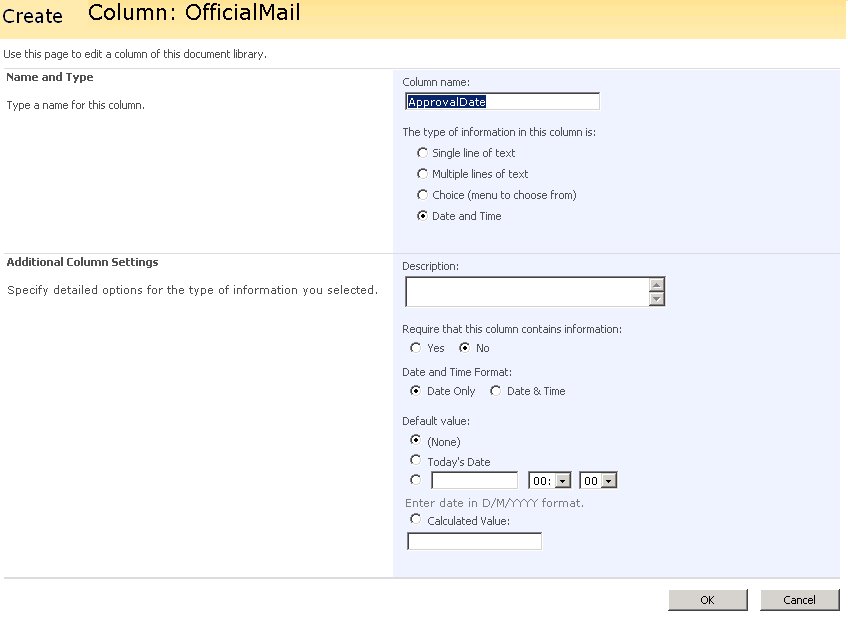
So watch out, and as you notice in the picture below: It ain't what it look like........

{
        private System.Web.UI.WebControls.Calendar ctlCalendar;

       protected override void Render(HtmlTextWriter writer)
      {
            this.EnsureChildControls();
            this.ctlCalendar.RenderControl(writer);
      }

     protected override void CreateChildControls()
    {
           this.Controls.Clear();
           this.ctlCalendar = new System.Web.UI.WebControls.Calendar();
           ctlCalendar.VisibleDate = DateTime.Today; this.ctlCalendar.DayRender _
              += new DayRenderEventHandler(ctlCalendar_DayRender);

           this.ctlCalendar.VisibleMonthChanged _
             += new MonthChangedEventHandler(ctlCalendar_VisibleMonthChanged);

           this.ctlCalendar.SelectionChanged _
             += new EventHandler(ctlCalendar_SelectionChanged); this.Controls.Add(ctlCalendar);
    }

     void ctlCalendar_SelectionChanged(object sender, EventArgs e)
    {
           this.Context.Response.Redirect(.......);
     }

      void ctlCalendar_VisibleMonthChanged(object sender, MonthChangedEventArgs e)
     {
        ctlCalendar.VisibleDate = e.NewDate;
     }

     void ctlCalendar_DayRender(object sender, DayRenderEventArgs e)
    {
           // Set date to bold if its today
            Style boldStyle = new Style();
            boldStyle.Font.Bold = true;

           if (e.Day.Date == DateTime.Today)
           { e.Cell.ApplyStyle(boldStyle); }
     }
}


.JPG)

