vrijdag, maart 02, 2007

Working with the Replicator in Sharepoint Workflows, some serialize issues & tricks

Before reading this post:

Keep in mind: A replicator is just a "workflow foreach".


When initializing a replicator you need to pass initiation data (like the foreach collection data). So if you want to pass a Contact for each replicated activity, you will set the initiationChildData (must implement IList) with Contact objects:
adding contacts like this: replicatorInitialChildData.Add(contact);

Sometimes you want the add your own classes to the List. You would except that this wouldn't be difficult, in fact it isn't:

Create the initiation data list with objects of your custom class:
IList replicatorInitialChildData = new List();
/ fill the list with the ApproverFlow objects
replicatorInitialChildData.Add(appFlowObj1);
replicatorInitialChildData.Add(appFlowObj2);


The code will compile, the workflow will succeed sometimes (when the replicator is used in Parallel execution), sometimes not (when the replicator is used in Sequence execution), after a while you will notice this kind of errors:

(in the log folder in C:\Program Files\Common Files\Microsoft Shared\web server extensions\12\LOGS)

Workflow Infrastructure 72eo Unexpected DehydrateInstance: System.Runtime.Serialization.SerializationException: End of
Stream encountered before parsing was completed. at System.Runtime.Serialization.Formatters.Binary.__BinaryParser.Run() at
System.Runtime.Serialization.Formatters.Binary.ObjectReader.Deserialize(HeaderHandler handler, __BinaryParser serParser, Boolean fCheck,
Boolean isCrossAppDomain, IMethodCallMessage methodCallMessage) at
System.Runtime.Serialization.Formatters.Binary.BinaryFormatter.Deserialize(Stream serializationStream, HeaderHandler handler, Boolean
fCheck, Boolean isCrossAppDomain, IMethodCallMessage methodCallMessage) at
System.Runtime.Serialization.Formatters.Binary.BinaryFormatter.Deserialize(Stream serializationStream) at
System.Workflow.ComponentModel.Activity.Load(Stream stream,...

02/27/2007 14:50:31.00* w3wp.exe (0x0A98) 0x1700 Windows SharePoint Services Workflow Infrastructure
72eo Unexpected ... Activity outerActivity, IFormatter formatter) at
System.Workflow.ComponentModel.Activity.Load(Stream stream, Activity outerActivity) at
System.Workflow.Runtime.Hosting.WorkflowPersistenceService.RestoreFromDefaultSerializedForm(Byte[] activityBytes, Activity outerActivity)
at Microsoft.SharePoint.Workflow.SPWinOePersistenceService.LoadWorkflowInstanceState(Guid instanceId) at
System.Workflow.Runtime.WorkflowRuntime.InitializeExecutor(Guid instanceId, CreationContext context, WorkflowExecutor executor,
WorkflowInstance workflowInstance) at System.Workflow.Runtime.WorkflowRuntime.Load(Guid key, CreationContext context,
WorkflowInstance workflowInstance) at System.Workflow.Runtime.WorkflowRuntime.GetWorkflow(Guid instanceId) at
Microsoft.SharePoint.Workflow.SPWinO...

System.Reflection.TargetInvocationException: Exception has been thrown by the target of an invocation. --->
System.InvalidOperationException: The platform does not know how to deserialize an object of type OfficialMail.Common.ApproverFlow+Approver.
The platform can deserialize primitive types such as strings, integers, and GUIDs; other
SPPersistedObjects or SPAutoserializingObjects; or collections of any of the above.
Consider redesigning your objects to store values in
one of these supported formats, or contact your software vendor for support.


You will notice the deserialize stuff.... If you think further, ..... whole the workflow idea is that every instance can be serialized or deserialized, because a workflow can wait for some other stuff, so objects will be saved somewhere (not in memory) when workflow is waiting.

When the replicator starts in parallel execution, no (de)serialize will occur because the workflow doens't need to serialize the objects, the replicator executes everything at once.
But when the replicator executes in sequence, it does need (de)serializing because the workflow will pause before executing the next step (so state is saved:(de)serializing occurs).


So when you want to add your own classes, keep in mind that your own class must be serializable.

Which types are serializable?
The platform can deserialize primitive types such as strings, integers, and GUIDs; other SPPersistedObjects or SPAutoserializingObjects; or collections of any of the above.

In one of the next blog posts, I will explain how to add/change data when the replicator is already running ...

dinsdag, februari 20, 2007

Team System : Team Explorer free download!

A reminder for myself ;-)

An essential client-side piece of Team System that installs as a Visual Studio 2005 add-in:
http://blogs.vertigosoftware.com/teamsystem/archive/2006/05/22/2778.aspx

maandag, januari 15, 2007

Handle the InfoPath Forms Services by yourself (in a Custom WebPart to view a web-enabled Infopath 2007 Form)

To understand this post well, please go through this post first:
- Hosting the InfoPath 2007 Form Editing Environment in a Custom Web Form

Sometimes you don't want to popup an error by InfoPath Forms Services (it will log this also in the EventLog), see image below. You want to catch the error in code and do some custom logging (or other stuff)


I will use the example when a dataconnection (webservices) in the form gives a time-out.

Preceding:
First keep in mind that we will bind the dataconnection-webservice to its control in code, so you have to deselect - Automatically retrieve data when form is opened (when adding a data-connection in InfoPath). Also don't forget to link the control with the dataconnection in infopath designer

What we gonna do in code:
- Add a handler that will get you into the Initialize methods of the XmlFormView
- Get the right dataconnection, execute it (so it will get the data and bind to the control)
- Add a "try/catch" block around this code

The code:


void viewform_Initialize(object sender, InitializeEventArgs e)
{
try
{
DataConnection dc = _viewform.XmlForm.DataSources["GetGAL"].QueryConnection;
dc.Execute();
}
catch (System.Net.WebException webEx)
{
WarmUpWebService();
ReloadWebPart();
//Log, ...
}
catch (Exception ex)
{
Logger.Log(ex, ...);
}
}


Some other InfoPath blogs:

woensdag, januari 10, 2007

Time-outs when using WebEnabled Infopath Form in Sharepoint 2007 WebParts

When you are using web-enabled infopath forms (that have dataconnections to webservices) in sharepoint 2007, you can get timeouts errors....

Example of an Time-out Exception:
Forms Services Runtime - Data Connections - TYPE: WARNING - EVENT 5566
The following query failed: GetSomething (User: MMMM\bbbbb, Form Name: formname, IP: , Request: http://serverZZZ/xxxx/yyyyy/composer.aspx?menu=3&Type=0, Form ID: urn:schemas-microsoft-com:office:infopath:xxxxxxx:-myXSD-2006-08-07T07-37-16, Type: DataAdapterException, Exception Message: The operation has timed outThe operation has timed out)

How to solve them?
  1. Check if your WebServices time-outs occur when you use the WebService directly (in a webbrowers), If so, you should change the timeout of the WebService in IIS Manager (InetMgr) or use more caching.

  2. If you are loading the Web-enabled InfoPath form into a custom webpart, you have to be sure that the following setting is used in the Form Library Advanced Settings page:
    Display as a Web Page (in stead of Open in the client application)


  3. Change the Data Connection Timeouts Settings. Open SharePoint 3.0 Central Administration: Goto Application Management > Configure InfoPath Forms Services
    Here you can change the Data Connection Timeouts Settings

Point 2 has fixed my problems...

maandag, januari 08, 2007

Problems starting VSTA in Infopath 2007 with Microsoft Office Server Sharepoint 2007 (.NET 3.0) installed *!!!FIXED!!!*

To fix the problem described below:

It worked for me when I did this:
uninstall .NET programmability support for .NET Framework version 2.0 and then reinstall it

(go to
Kristof his blog for full explanation)

When I want to add custom C# in an Infopath 2007 form, I get this error:


InfoPath cannot start Microsoft Visual Studio Tools for Applications.
To work with Visual Basic or C# code, Microsoft Visual Studio Tools for Applications (VSTA) is required. the Microsoft .NET Framework 2.0 and Microsoft Core XML Services 6.0 must be installed prior to installing VSTA. To install VSTA, open Add or Remove Programs, locate your 2007 Microsoft Office System installation, and then click Change


How should I make this work? Reinstalling some things? I think the .NET 3.0 will cause the problems....


This stuff is installed:


  • Microsoft .NET Compact Framework 1.0 SP3 Developer
  • Microsoft .NET Compact Framework 2.0
  • Microsoft .NET Framework 2.0
  • Microsoft .NET Framework 3.0
  • Microsoft Office Enterprise 2007
  • Microsoft Office Sharepoint Designer 2007
  • Microsoft Office Sharepoint Server 2007
  • Microsoft Visual Studio 2005 Professional Edition
  • Microsoft Visual Studio 2005 Team Explorer
  • Microsoft Visual Studio 2005 Tools for Office Runtime
  • Windows Server 2003 Service Pack 1
  • Regarding Workflow:
    Enterprise Content Management Starter Kit for 2007 Office System (beta 2 tr)
When I want to re-installing MSXML 6.0 I get this error:


Installation of MSXML 6.0 Parser failed because a higher version already exists on the machine. To proceed uninstall the higher version and then run MSXML 6.0 Parser Setup again


Kristof De Causemaeker add some more comments:
When you want to create an InfoPath Add-in project via VSTO, it also give errors...
I thinks that VSTO/VSTA in combination with .NET 3.0 and InfoPath 2007 will not work yet..... Maybe a Windows Registry problem?

maandag, januari 01, 2007

Welcome To 2007!

Happy New Year and welcome to the Year of Bond, James Bond ;-)

woensdag, december 27, 2006

The basic principles and usage of NHibernate by Maarten Balliauw

Maarten Balliauw wrote an article (written in Dutch) on the basic principles and usage of NHibernate, an ORM-mapper for the .NET platform. You have to readhis article!

Checkout his blog post about his article: here

maandag, december 04, 2006

zaterdag, november 25, 2006

Using CAML to filter a infopath published boolean field (from a sharepoint list)

In a infopath form we have a boolean field called Draft, we publish the form to a sharepoint list, and we want to filter that list using Caml queries:
Which value should the BOOLEANVALUE have to succeed the query?
False/True ? Yes/No ? 0/1 ?
What I noticed is, when I published the infopath form the boolean type in intopath will be a Yes/No Type in the sharepoint list.....

So the Caml query will not work with BOOLEANVALUE = False/True Or Yes/No , you have to use 0 or 1...

Implement the CAML query into code:

StringBuilder camlBuilder = new StringBuilder();

string queryText = camlBuilder.ToString();

SPWeb site = SPContext.Current.Web;
SPList list = site.Lists["Mail"];
SPQuery query = new SPQuery();
string queryText =""
query.Query = queryText;

results = list.GetItems(query);
foreach (SPListItem item in results)
{..............}

If you put the query Tag as root tag into the query text, you will receive all items, zo don't put it there, some stupid guy I know very good did that ;-)

Also check this out:
U2U CAML Query Builder and Execution Tool (+download)

SPListItem looses Property data type when publishing Infopath form to a sharepoint list (MOSS 2007 beta2TR)

When you publish a Infopath Form to a sharepoint list, the Infopath form contains some fields (text and date(time) data types). These fields are copied to a sharepoint list when you publish the form to it.


You should think sharepoint keeps the data types like in the infopath form, but this isn't, I noticed that the date(time) data type is just a string/text field in the sharepoint list!

The strange thing is that when you add a column in the published list manualy (for example a datetime field), it will keep the data type and not change it to a string.

I noticed it when a wanted to perform an update an a field called ApprovalDate (Date Datatype) in a Web Part:


SPSite site = new SPSite("http://......");
SPListItemCollection results = site.Lists["InfopathPublishedList"].Items;
foreach (SPListItem item in results)
{
item.Properties["ApprovalDate"] = DateTime.Today;//DateTime.Today.ToString();
item.Update();
}

This code failed when I did this on the datetime field published by infopath:

Error:Specified data type does not match the current data type of the property. at Microsoft.SharePoint.Utilities.SPUtility.UpdateArrayFromHashtable(Object& o, Hashtable ht) at Microsoft.SharePoint.SPListItem.PrepareItemForUpdate(Guid newGuidOnAdd, Boolean bMigration, Boolean& bAdd, Boolean& bPublish, Object&
objAttachmentNames, Object& objAttachmentContents, Int32& parentFolderId) at Microsoft.SharePoint.SPListItem.UpdateInternal(Boolean bSystem, Boolean bPreserveItemVersion, Guid newGuidOnAdd, Boolean bMigration,
Boolean bPublish, Boolean bNoVersion, Boolean bCheckOut, Boolean bCheckin, Boolean suppressAfterEvents) at Microsoft.SharePoint.SPListItem.Update()


This doesn't happen if the ApprovalDate is added by create column in the list.
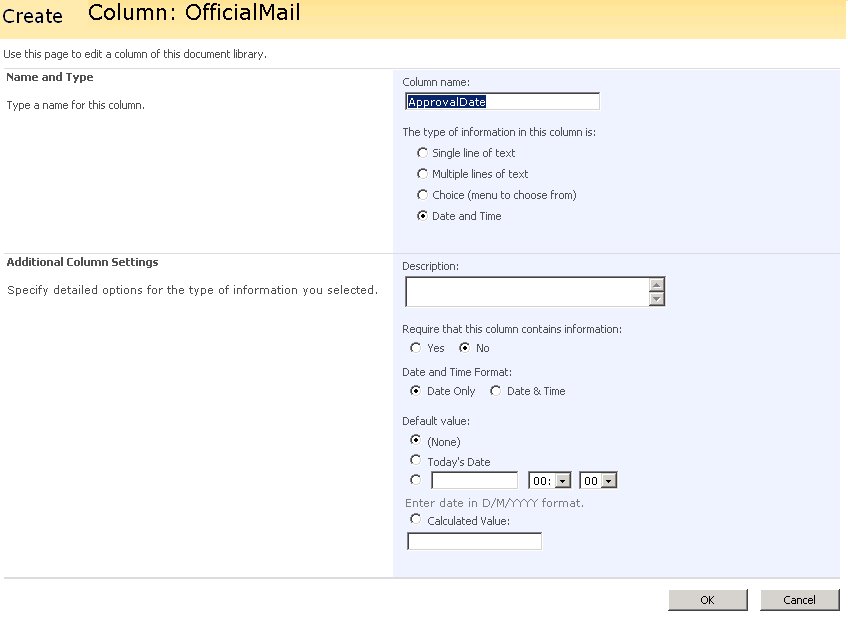


So watch out, and as you notice in the picture below: It ain't what it look like........


dinsdag, november 21, 2006

System.Web.UI.WebControls.WebControl doesn't fire all events

During the development of a ServerControl for a masterpage in a Sharepoint site, I added some eventhandlers in the CreateChildControls(): DayRender, VisibleMonthChanged and SelectionChanged.

After debugging, I noticed that only the DayRender event worked. I googled sites and newsgroups to find a solution, but I didn't find an answer....
After sending this problem to a colleague(thanks to: Sam), he answered this:

If you inherit controls from the WebControl class, you will get problems with events and state. So if you need dynamic controls, let them inherit from the CompositeControl class, this class is special made for controls that contains other controls.

At the CompositeControl MSDN page I found this:
The CompositeControl class is an abstract class that provides naming container and control designer functionality for custom controls that encompass child controls in their entirety or use the functionality (STATE AND EVENT HANDLING?!!?) of other controls.

Below some code of a custom Calendar that inherit from CompositeControl :

public class MailCalendar : System.Web.UI.WebControls.CompositeControl

{
private System.Web.UI.WebControls.Calendar ctlCalendar;

protected override void Render(HtmlTextWriter writer)
{
this.EnsureChildControls();
this.ctlCalendar.RenderControl(writer);
}

protected override void CreateChildControls()
{
this.Controls.Clear();
this.ctlCalendar = new System.Web.UI.WebControls.Calendar();
ctlCalendar.VisibleDate = DateTime.Today; this.ctlCalendar.DayRender _
+= new DayRenderEventHandler(ctlCalendar_DayRender);

this.ctlCalendar.VisibleMonthChanged _
+= new MonthChangedEventHandler(ctlCalendar_VisibleMonthChanged);

this.ctlCalendar.SelectionChanged _
+= new EventHandler(ctlCalendar_SelectionChanged); this.Controls.Add(ctlCalendar);
}

void ctlCalendar_SelectionChanged(object sender, EventArgs e)
{
this.Context.Response.Redirect(.......);
}

void ctlCalendar_VisibleMonthChanged(object sender, MonthChangedEventArgs e)
{
ctlCalendar.VisibleDate = e.NewDate;
}

void ctlCalendar_DayRender(object sender, DayRenderEventArgs e)
{
// Set date to bold if its today
Style boldStyle = new Style();
boldStyle.Font.Bold = true;

if (e.Day.Date == DateTime.Today)
{ e.Cell.ApplyStyle(boldStyle); }
}
}

More info: Webblog ScottGu

dinsdag, oktober 17, 2006

Writing Custom Web Parts for SharePoint 2007

On Scott Guthrie's Blog you can find a post with lots of info about "Writing Custom Web Parts for SharePoint 2007"

donderdag, oktober 12, 2006

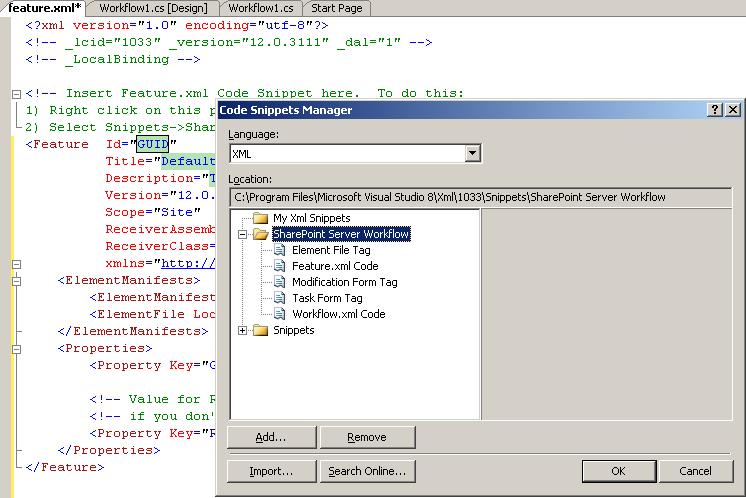
Error loading snippets in feature.xml and workflow.xml file

If the code snippets are not showing up in Visual Studio, go to Tools -> Code Snippets Manager, change the language to XML, and add "C:\Program Files\Microsoft Visual Studio 8\Xml\1033\Snippets\SharePoint Server Workflow" to your snippets.


If you don't see the Code Snippets Manager in VS 2005: JOPX will explain how you add that! link