At http://www.dotnetjohn.com/ I found a very usefull article about Xpath:
Using XPath to Extract Data From XML
Check it out
woensdag, mei 31, 2006

donderdag, mei 18, 2006
Bullshit Bingo - How to stay awake in meetings
From Guy Bursteins blog, seen on JopX blog
Do you keep falling asleep in meetings and seminars? What about those long and boring conference calls? Here's a way to change all of that. 1. Before (or during) your next meeting, seminar, or conference call, prepare yourself by drawing a square. I find that 5" x 5" is a good size. Divide the card into columns - five across and five down. That will give you 25 one-inch blocks. 2. Write one of the following words/phrases in each block:
synergy
strategic fit
core competences
best practice
bottom line
revisit
expeditious
to tell you the truth (or "the truth is")
24/7
out of the loop
benchmark
value-added
proactive
win-win
think outside the box
fast track
result-driven
empower (or empowerment)
knowledge base
at the end of the day
touch base
mindset
client focus(ed)
paradigm
game plan
leverage3.
Check off the appropriate block when you hear one of those words/phrases. 4. When you get five blocks horizontally, vertically, or diagonally, stand up and shout "BULLSHIT!" Testimonials from satisfied "Bullshit Bingo" players: "I had been in the meeting for only five minutes when I won." - Adam, Atlanta "My attention span at meetings has improved dramatically." - David, Florida "What a gas! Meetings will never be the same for me after my first win." - Dan, New York City "The atmosphere was tense in the last process meeting as 14 of us waited for the fifth box." - Ben, Denver "The speaker was stunned as eight of us screamed 'BULLSHIT!' for the third time in two hours." - Paul, Cleveland
Enjoy your meetings!
vrijdag, april 28, 2006
Convert byte[] to an Image/bitmap: why the System.ArgumentException: Invalid parameter used arises.....
I need images saved by an old vb6 program and convert them to a new db of a new prog. The old programma saved the images data into a image field of a SQL2000 DB. First I justed copy the image from V1 (db of the old programma) to V2 (the db (also SQL2000) used in the new program).
Problem: the data in the image field is corrupt! When I try to convert that data into a bitmap or jpg it gives me a Invalid parameter Exception when I do this code:
MemoryStream ImageDataStream = new MemoryStream();
// byte[] ImageData, filled with the image field of db
ImageDataStream.Write(ImageData,0,ImageData.Length);
ImageDataStream.Position=0;
Image img = Image.FromStream(ImageDataStream); //Invalid parameter Exception thrown
This is because the byte data of ImageData is corrupt due a Unicode encoding done by the old VB6 programma before/while saving it to db. Below some byte code (hex style) so that you can see the the good data vs the corrupt/wrong data:

A bitmap header starts with BM, so there you see that the is a doubling of the data: from 42 4D to 42 00 4D 00 => convertion to Unicode. You can't simply remove the 00 because unicoding is not just a 00 extend. For example 75 87 95 59 (see above in picture) will be converted to 75 00 21 20 22 20 59 00 and not just 75 00 87 00 95 00 59 00 !!
So what you have to do is convert the data back to the current ANSI code page (Encoding.Default):
ImageData=System.Text.UnicodeEncoding.Convert(Encoding.Unicode,Encoding.Default,ImageData);
So the code below will do the good convertion......
MemoryStream ImageDataStream = new MemoryStream();
ImageDataStream.Write(ImageData,0,ImageData.Length);
ImageDataStream.Position=0;
ImageData=System.Text.UnicodeEncoding.Convert(Encoding.Unicode,Encoding.Default,ImageData);
Image img = Image.FromStream(ImageDataStream);
Not every "Invalid parameter used" exception will be fixed like that, sometimes you need an other Convertion with other Encoder parameters or the image can have a added header (like the 78 long ole-header,..... => the code will be like ImageDataStream.Write(ImageData,78,ImageData.Length-78); )
Good luck!
Problem: the data in the image field is corrupt! When I try to convert that data into a bitmap or jpg it gives me a Invalid parameter Exception when I do this code:
MemoryStream ImageDataStream = new MemoryStream();
// byte[] ImageData, filled with the image field of db
ImageDataStream.Write(ImageData,0,ImageData.Length);
ImageDataStream.Position=0;
Image img = Image.FromStream(ImageDataStream); //Invalid parameter Exception thrown
This is because the byte data of ImageData is corrupt due a Unicode encoding done by the old VB6 programma before/while saving it to db. Below some byte code (hex style) so that you can see the the good data vs the corrupt/wrong data:
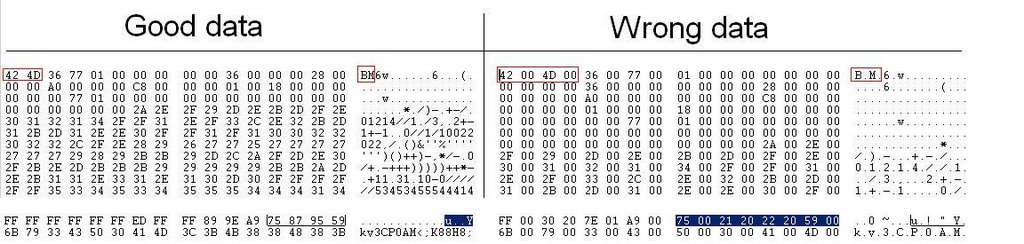
A bitmap header starts with BM, so there you see that the is a doubling of the data: from 42 4D to 42 00 4D 00 => convertion to Unicode. You can't simply remove the 00 because unicoding is not just a 00 extend. For example 75 87 95 59 (see above in picture) will be converted to 75 00 21 20 22 20 59 00 and not just 75 00 87 00 95 00 59 00 !!
So what you have to do is convert the data back to the current ANSI code page (Encoding.Default):
ImageData=System.Text.UnicodeEncoding.Convert(Encoding.Unicode,Encoding.Default,ImageData);
So the code below will do the good convertion......
MemoryStream ImageDataStream = new MemoryStream();
ImageDataStream.Write(ImageData,0,ImageData.Length);
ImageDataStream.Position=0;
ImageData=System.Text.UnicodeEncoding.Convert(Encoding.Unicode,Encoding.Default,ImageData);
Image img = Image.FromStream(ImageDataStream);
Not every "Invalid parameter used" exception will be fixed like that, sometimes you need an other Convertion with other Encoder parameters or the image can have a added header (like the 78 long ole-header,..... => the code will be like ImageDataStream.Write(ImageData,78,ImageData.Length-78); )
Good luck!
donderdag, april 27, 2006
Messed up bitmap data ? FIXED (SEE ABOVE!)
On http://www.lierse.be/VB6bitmap.zip is a dat file (from an image field in SQL2000), it is a bitmap file, in an old VB6 programma that image is used and visible. So it is valid data. Problem: no code of vb6 of that prog is available.
My question: What is wrong with the bitmap data? does vb6 add some rubbish to it? I can't load it into image object in C# because a invalid argument exception (because somethings is wrong in the header or ...). I tried every offset (some people say use 78 as offset, because there will be a OLE header), and every offset gives the same error. I get an invalid argument when i do this:
ImageDataStream.Write(ImageData,i,ImageData.Length-i); // ok, tried every value of i
Image img = Image.FromStream(ImageDataStream); // the invalid argument error rises here
I'm trying now to rip the pixeldata and put the pixeldata in a own created bitmapfile with correct header/colormap... But still something is wrong, the pixeldata contains good data and then a piece of FF 00 FF 00 of the same length and that a few times....
Anybody knows what vb6 does to the imagedata when saving it to SQL2000 ? any tips are welcome.......
My question: What is wrong with the bitmap data? does vb6 add some rubbish to it? I can't load it into image object in C# because a invalid argument exception (because somethings is wrong in the header or ...). I tried every offset (some people say use 78 as offset, because there will be a OLE header), and every offset gives the same error. I get an invalid argument when i do this:
ImageDataStream.Write(ImageData,i,ImageData.Length-i); // ok, tried every value of i
Image img = Image.FromStream(ImageDataStream); // the invalid argument error rises here
I'm trying now to rip the pixeldata and put the pixeldata in a own created bitmapfile with correct header/colormap... But still something is wrong, the pixeldata contains good data and then a piece of FF 00 FF 00 of the same length and that a few times....
Anybody knows what vb6 does to the imagedata when saving it to SQL2000 ? any tips are welcome.......
Internal Compiler Error: stage 'COMPILE' or 'BEGIN' errors
It happens sometimes, stupid bug in VS 2003? Most of the times it is one function that has a type error that for some kind of reason is not seen by the compiler (like DataRow myDataRow = new DataRRow();). Simply restart VS and look through your code and fix the mistyped stuff in the function......
donderdag, januari 19, 2006
Object reference not set to an instance of an object: System.NullReferenceException
When you receive this error, stop searching for a solution, first try to restart IIS (if that doesn't work: restart your pc) and check if the error is still there.... It worked with me, after searching an hour for a solution....
I also noticed that the vs 2003 debugger went very slow when the error occures
Object reference not set to an instance of an object.
Description: An unhandled exception occurred during the execution of the current web request. Please review the stack trace for more information about the error and where it originated in the code.
Exception Details: System.NullReferenceException: Object reference not set to an instance of an object.
Source Error:
An unhandled exception was generated during the execution of the current web request. Information regarding the origin and location of the exception can be identified using the exception stack trace below.
Stack Trace:
[NullReferenceException: Object reference not set to an instance of an object.]
System.Web.UI.Control.OnBubbleEvent(Object source, EventArgs args)
System.Web.UI.Control.RaiseBubbleEvent(Object source, EventArgs args)
System.Web.UI.WebControls.Button.OnCommand(CommandEventArgs e)
System.Web.UI.WebControls.Button.System.Web.UI.IPostBackEventHandler.RaisePostBackEvent(String eventArgument)
System.Web.UI.Page.RaisePostBackEvent(IPostBackEventHandler sourceControl, String eventArgument)
System.Web.UI.Page.RaisePostBackEvent(NameValueCollection postData)
System.Web.UI.Page.ProcessRequestMain()
I also noticed that the vs 2003 debugger went very slow when the error occures
Object reference not set to an instance of an object.
Description: An unhandled exception occurred during the execution of the current web request. Please review the stack trace for more information about the error and where it originated in the code.
Exception Details: System.NullReferenceException: Object reference not set to an instance of an object.
Source Error:
An unhandled exception was generated during the execution of the current web request. Information regarding the origin and location of the exception can be identified using the exception stack trace below.
Stack Trace:
[NullReferenceException: Object reference not set to an instance of an object.]
System.Web.UI.Control.OnBubbleEvent(Object source, EventArgs args)
System.Web.UI.Control.RaiseBubbleEvent(Object source, EventArgs args)
System.Web.UI.WebControls.Button.OnCommand(CommandEventArgs e)
System.Web.UI.WebControls.Button.System.Web.UI.IPostBackEventHandler.RaisePostBackEvent(String eventArgument)
System.Web.UI.Page.RaisePostBackEvent(IPostBackEventHandler sourceControl, String eventArgument)
System.Web.UI.Page.RaisePostBackEvent(NameValueCollection postData)
System.Web.UI.Page.ProcessRequestMain()
maandag, januari 16, 2006

vrijdag, december 30, 2005
Installing IIS After .NET Framework
If you install IIS after .NET framework or if you removed and reinstalled IIS on a server that has .NET framework, then your ASP.NET pages will not work.
This is because you are missing the IIS mappings associating the ASP.NET file extensions.
To fix IIS mappings for ASP.NET, follow these steps:
1. Click Start -> run -> cmd - ENTER
2. At the command prompt, type the following, and then press ENTER:
"%windir%\Microsoft.NET\Framework\version\aspnet_regiis.exe" -i
In this path, version represents the version number of the .NET Framework that you installed on your server. You need to replace with the actual version number when you type the command.
3. Register the Aspnet_isapi.dll by clicking start -> run
4. In the Open text box, type "regsvr32 %windir%\Microsoft.NET\Framework\version\aspnet_isapi.dll" and then press ENTER
SOURCE
This is because you are missing the IIS mappings associating the ASP.NET file extensions.
To fix IIS mappings for ASP.NET, follow these steps:
1. Click Start -> run -> cmd - ENTER
2. At the command prompt, type the following, and then press ENTER:
"%windir%\Microsoft.NET\Framework\version\aspnet_regiis.exe" -i
In this path, version represents the version number of the .NET Framework that you installed on your server. You need to replace with the actual version number when you type the command.
3. Register the Aspnet_isapi.dll by clicking start -> run
4. In the Open text box, type "regsvr32 %windir%\Microsoft.NET\Framework\version\aspnet_isapi.dll" and then press ENTER
SOURCE
woensdag, december 14, 2005
IIS Virtual Directory Bug, VDir in VDir sometimes hidden (invisible due security?)
The VDir (in another Vdir) will be correct created with no errors, but most of the time the VDir isn't visible in IIS?!?
Although it isn't visible, you can reach it! (example): http://localhost/VDIR/VDIR/something.aspx no error!!!
It looks like there is an User interface bug that hides the VDIR for some reason (security issue?)
So if you want to change options of that VDIR, you have to install MetaEdit (Tool for editing the IIS Metabase)
(install-link + more info)
Some other people had the same problems (source-url)
Although it isn't visible, you can reach it! (example): http://localhost/VDIR/VDIR/something.aspx no error!!!
It looks like there is an User interface bug that hides the VDIR for some reason (security issue?)
So if you want to change options of that VDIR, you have to install MetaEdit (Tool for editing the IIS Metabase)
(install-link + more info)
Some other people had the same problems (source-url)
donderdag, december 08, 2005
Adding a Visual basic (vbs) script into a web setup project to add a virtual directory in ISS
Beneath there is a possible solution for the problem, but visual basic scripting is not good for using in setup projects (sometimes virusscanners block it!)
Because of the strange bug in IIS (look here), I used vbs to make the virtual dirs. But there is a better way, create & configure the Virtual Directory's
in a class that will run during setup:
< RunInstaller(True)> Public Class WebInstaller Inherits System.Configuration.Install.Installer
' Some Component Designer generated code
Public Overrides Sub Install(ByVal state As IDictionary)
' Write here code to do during setup (creating Vdirs, .....)
End Sub
Look at the url below to read about "Customizing Windows and Web setup projects"
All about Installers - Customizing Windows and Web setup projects &
Conditional Install of Desktop and Quick Launch Shortcuts
You must create a virtual directory linked to a path in a script, because in a web setup project it isn't possible to create a virtual dir linked to a path
Also I had to set some options of that directory:
Set Directory Settings to Integrated Windows authentication (without Anonymous access):
IIsWebVDirObj.Put "AuthFlags", 4
(All the AuthFlags" options:
http://msdn.microsoft.com/library/en-us/iissdk/html/14b96ff9-94e6-49f4-8d61-160111041bd5.asp)
(Tip: if you want to combine security setting, like Integrated Windows authentication AND Anonymous access, set
the AuthFlags to 4+1 , the 1 from Anonymous authentication)
IIsWebVDirObj.Put "Path", "C:\Program Files\Unique World Software\InfoView"
This is the path where the virtual directory is referenced to
Set the Read Access to true
IIsWebVDirObj.Put "AccessRead", True
Set the Script Access to true
IIsWebVDirObj.Put "AccessScript", True
More info:
Creating Sites and Virtual Directories Using ADSI
IIsWebVirtualDir (ADSI)
IIS ADSI Provider Overview
Remove IIS Anonymous Access
IIS ADSI arguments info for create,delete,.... of virtual dir
Because of the strange bug in IIS (look here), I used vbs to make the virtual dirs. But there is a better way, create & configure the Virtual Directory's
in a class that will run during setup:
< RunInstaller(True)> Public Class WebInstaller Inherits System.Configuration.Install.Installer
' Some Component Designer generated code
Public Overrides Sub Install(ByVal state As IDictionary)
' Write here code to do during setup (creating Vdirs, .....)
End Sub
Look at the url below to read about "Customizing Windows and Web setup projects"
All about Installers - Customizing Windows and Web setup projects &
Conditional Install of Desktop and Quick Launch Shortcuts
You must create a virtual directory linked to a path in a script, because in a web setup project it isn't possible to create a virtual dir linked to a path
Also I had to set some options of that directory:
Set Directory Settings to Integrated Windows authentication (without Anonymous access):
IIsWebVDirObj.Put "AuthFlags", 4
(All the AuthFlags" options:
http://msdn.microsoft.com/library/en-us/iissdk/html/14b96ff9-94e6-49f4-8d61-160111041bd5.asp)
(Tip: if you want to combine security setting, like Integrated Windows authentication AND Anonymous access, set
the AuthFlags to 4+1 , the 1 from Anonymous authentication)
IIsWebVDirObj.Put "Path", "C:\Program Files\Unique World Software\InfoView"
This is the path where the virtual directory is referenced to
Set the Read Access to true
IIsWebVDirObj.Put "AccessRead", True
Set the Script Access to true
IIsWebVDirObj.Put "AccessScript", True
More info:
Creating Sites and Virtual Directories Using ADSI
IIsWebVirtualDir (ADSI)
IIS ADSI Provider Overview
Remove IIS Anonymous Access
IIS ADSI arguments info for create,delete,.... of virtual dir
woensdag, december 07, 2005
ASP.net error: "The resource cannot be found" because of a stupid "/" in IIS configuration (home directory, local path ) !
When I was testing a Web Setup project I always get a strange error (after the installation):
Server Error in '/TEST' Application.
--------------------------------------------------------------------------------
The resource cannot be found.
Description: HTTP 404. The resource you are looking for (or one of its dependencies) could have been removed, had its name changed, or is temporarily unavailable. Please review the following URL and make sure that it is spelled correctly.
Requested Url: /TEST/Index.aspx
-------------------------------------------------------------------------------
Version Information: Microsoft .NET Framework Version:1.1.4322.2032; ASP.NET Version:1.1.4322.2032
The /TEST/Index.aspx file exist in the right path on my hard disk, so I went on searching and I found out that there were several people which had the same error-problem!
I find the solution (link) :
Under the root path in IIS configuration, under "Home Directory"
under the field "local path". "c:\inetpub\mywebsite\" is not the same
as "c:\inetpub\mywebsite" apparently now. My site came back alive as
soon as I removed the trailing backslash so that the path now says
"c:\inetpub\mywebsite"!
So you see that a stupid backslash can do harm!
Server Error in '/TEST' Application.
--------------------------------------------------------------------------------
The resource cannot be found.
Description: HTTP 404. The resource you are looking for (or one of its dependencies) could have been removed, had its name changed, or is temporarily unavailable. Please review the following URL and make sure that it is spelled correctly.
Requested Url: /TEST/Index.aspx
-------------------------------------------------------------------------------
Version Information: Microsoft .NET Framework Version:1.1.4322.2032; ASP.NET Version:1.1.4322.2032
The /TEST/Index.aspx file exist in the right path on my hard disk, so I went on searching and I found out that there were several people which had the same error-problem!
I find the solution (link) :
Under the root path in IIS configuration, under "Home Directory"
under the field "local path". "c:\inetpub\mywebsite\" is not the same
as "c:\inetpub\mywebsite" apparently now. My site came back alive as
soon as I removed the trailing backslash so that the path now says
"c:\inetpub\mywebsite"!
So you see that a stupid backslash can do harm!
woensdag, november 30, 2005
Javascript helps you, to go to an anchor on your webpage
This function (VB. NET) uses javascript to navigate to a specific anchor on your webpage,
This function is only for navigating to #convert, but you can easy change the function offcourse:

If anybody knows how this is possible in ASP.NET, let me know, I'm not a freak yet
This function is only for navigating to #convert, but you can easy change the function offcourse:

If anybody knows how this is possible in ASP.NET, let me know, I'm not a freak yet
Setting the description of a Windows Service isn't possible? [UPDATED: yes it is!]
When I did my first Windows Service, everything was going smooth.
Only stupid thing that I didn't find out was how to set the description text (visible in service overview).....
Something I find was the ServiceProcessDescriptionAttribute, but I didn't find out how to link it with the service
Blogs that also mention this problem:
http://www.jasonbock.net/JB/Default.aspx?blog=entry.b36451aa549f4e238a7aafa18b770aa6
http://www.jasonbock.net/JB/Default.aspx?blog=entry.c0ca31947dcc48278600834533ee16ea
Finally I found a solution on The Code Project:
Adding a description to a .NET Windows Service:http://www.codeproject.com/dotnet/dotNETSCMDescription.asp
Only stupid thing that I didn't find out was how to set the description text (visible in service overview).....
Something I find was the ServiceProcessDescriptionAttribute, but I didn't find out how to link it with the service
Blogs that also mention this problem:
http://www.jasonbock.net/JB/Default.aspx?blog=entry.b36451aa549f4e238a7aafa18b770aa6
http://www.jasonbock.net/JB/Default.aspx?blog=entry.c0ca31947dcc48278600834533ee16ea
Finally I found a solution on The Code Project:
Adding a description to a .NET Windows Service:http://www.codeproject.com/dotnet/dotNETSCMDescription.asp
dinsdag, november 29, 2005
dinsdag, oktober 18, 2005
Abonneren op:
Posts (Atom)
